You search for your business on Google Maps, and it’s just gone. Your phone stops ringing. Customers can’t find your location. The reviews you spent years earning have disappeared from search results entirely. If this happened to you, you’re not imagining things, and you’re not alone. Every year, thousands of legitimate, well-run businesses have their Google Business Profile suspended, often without any warning at all.
The good news is that most suspensions can be resolved once you understand why it happened and follow the right recovery process. This Google Business Profile recovery guide walks through exactly that, along with when it makes sense to bring in professional Google Business Profile support instead of handling it alone.
Table of Contents
- What Does a Google Business Profile Suspension Mean?
- Why Google Suspends Business Profiles
- Soft Suspension vs. Hard Suspension
- How to Check Why Your Profile Was Suspended
- How to Recover a Suspended Google Business Profile
- Common Mistakes That Delay Reinstatement
- How Long Does Reinstatement Take?
- How to Prevent Future Suspensions
- When to Get Professional Help
- Why Choose VMarket360
- Frequently Asked Questions
What Does a Google Business Profile Suspension Mean?
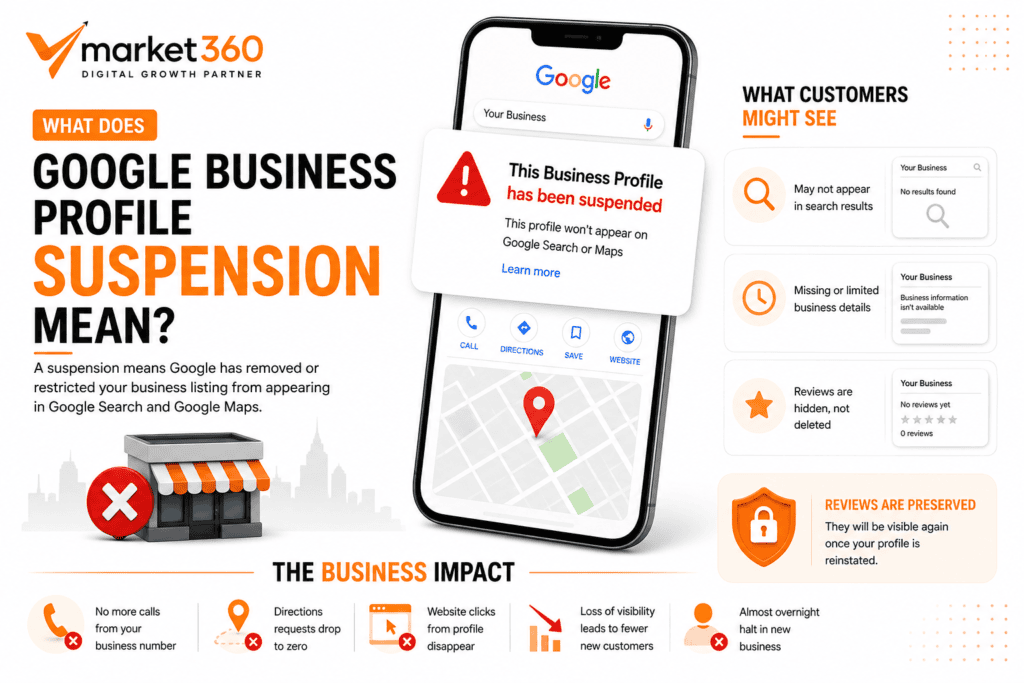
A suspension means Google has removed or restricted your business listing from appearing in Google Search and Google Maps. Depending on the type of suspension, your listing might disappear from search results entirely, or it might still show up with limited functionality while you lose the ability to manage it.
What customers actually see varies. In some cases, your listing simply won’t appear when someone searches for your business by name. In others, it may show up without key details like your phone number, hours, or reviews. Reviews themselves are usually preserved during a suspension rather than deleted, though they won’t be visible until your profile is reinstated.
The business impact is immediate and real. Calls stop coming in through your listed number. Directions requests through Google Maps drop to zero. Website clicks from your profile disappear. For businesses that rely heavily on local search for new customers, a suspension can mean an almost overnight halt in new business.
Why Google Suspends Business Profiles
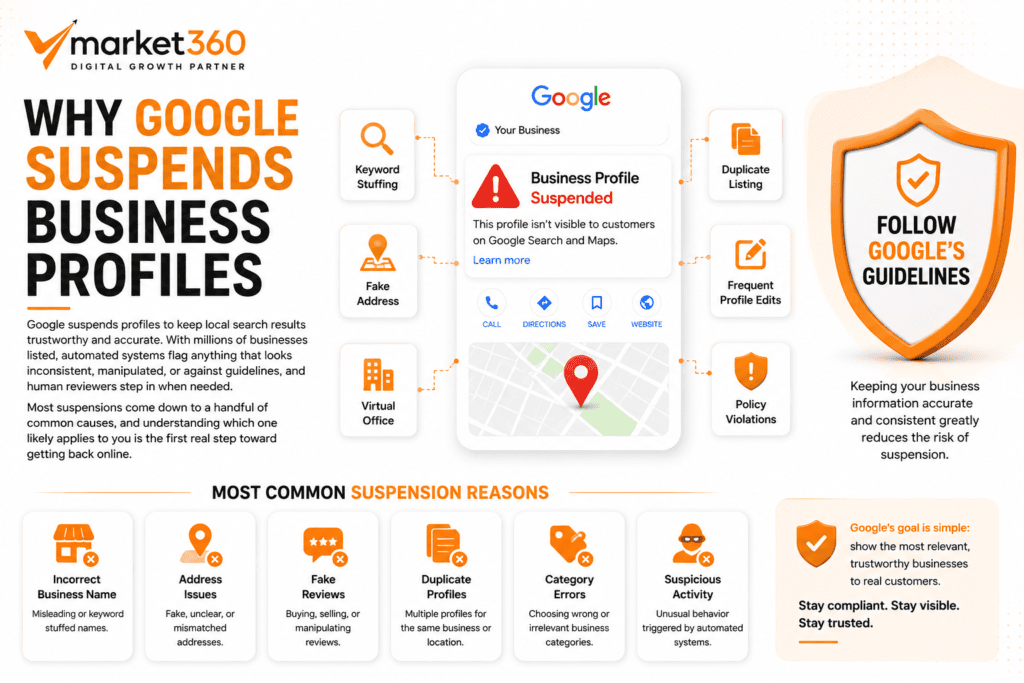
Google suspends profiles to keep local search results trustworthy and accurate. With millions of businesses listed, automated systems flag anything that looks inconsistent, manipulated, or against guidelines, and human reviewers step in when needed. Most suspensions come down to a handful of common causes, and understanding which one likely applies to you is the first real step toward getting back online.
Business name guideline violations. Your business name on the profile should match your real-world signage and branding exactly. Adding keywords, locations, or services into your business name (like “Smith Plumbing Arlington Emergency 24/7”) violates Google’s guidelines and is one of the most common triggers for suspension.
Virtual offices or PO boxes. Google requires a real, physical location where customers could visit or where you conduct business. Listing a virtual office, a UPS store address, or a PO box as your business address often results in suspension once Google’s systems catch it.
Address inconsistencies. If the address on your Google profile doesn’t match what appears on your website, other directories, or official business documents, that inconsistency can trigger a review and potential suspension.
Duplicate listings. If your business has more than one active profile for the same location, whether created accidentally or by a previous employee, Google may suspend one or both listings until the duplication is resolved.
Keyword stuffing. Beyond just the business name, stuffing keywords into your business description or other fields in an attempt to rank for more terms is a guideline violation Google actively looks for.
Service area issues. Businesses that operate as service-area businesses (meaning you go to customers rather than customers coming to you) need to set this up correctly. Listing a physical storefront address when you don’t actually see customers there is a common mistake that leads to suspension.
Frequent profile edits. Making rapid, repeated changes to your business name, address, phone number, or category can trigger Google’s automated fraud detection, since this pattern resembles what happens when a listing gets hijacked or manipulated.
Missing business documentation. When Google requests verification of your business and you don’t respond, or the documentation doesn’t clearly support your listing details, suspension often follows.
Suspicious activity. This is a broad category that includes things like unusual review patterns, login activity from unexpected locations, or other signals that suggest the account may be compromised or manipulated.
Quality guideline violations. This covers everything from fake reviews to misleading business information to content that doesn’t accurately represent your business.
Soft Suspension vs. Hard Suspension
Not all suspensions are the same, and understanding which type you’re dealing with affects how you approach recovery.
| Soft Suspension | Hard Suspension | |
|---|---|---|
| Listing visibility | May still appear in search results | Listing removed entirely |
| Management access | Limited access to edit your profile | Full suspension, no management access |
| Recovery difficulty | Often easier and faster to resolve | Usually requires more thorough documentation |
| Common cause | Minor guideline issues, incomplete info | Serious or repeated guideline violations |
A soft suspension is generally a signal that something needs correcting, but your business hasn’t lost all visibility. A hard suspension is more serious and usually means Google has identified a significant policy violation or repeated pattern of issues.
How to Check Why Your Profile Was Suspended
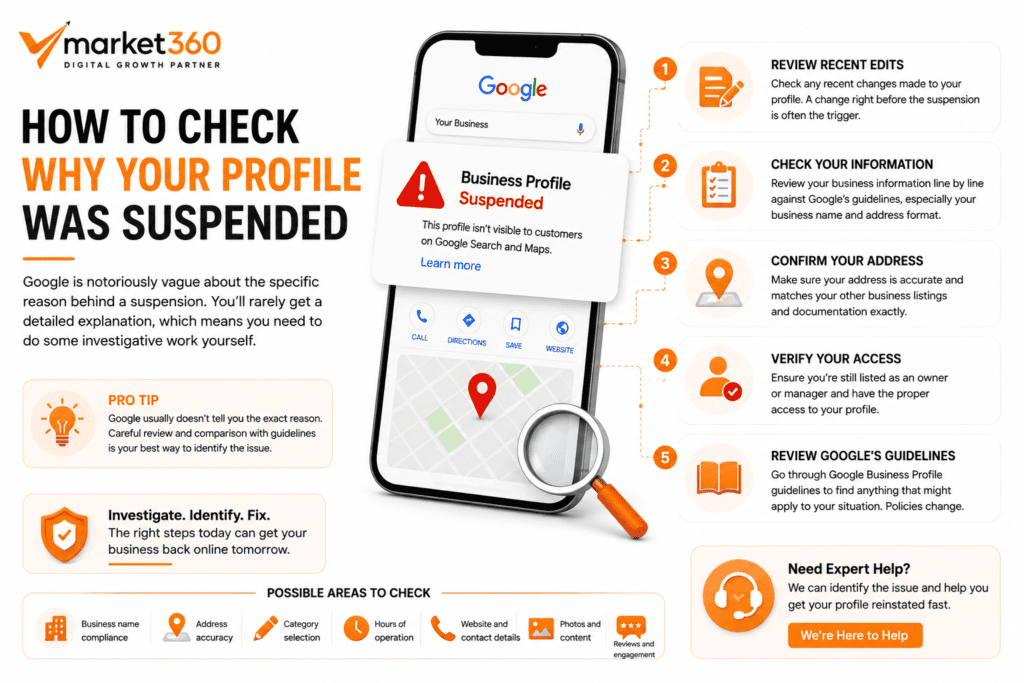
Google is notoriously vague about the specific reason behind a suspension. You’ll rarely get a detailed explanation, which means you need to do some investigative work yourself.
Start by reviewing any recent edits made to your profile, since a change right before the suspension is often the trigger. Check your business information line by line against Google’s guidelines, paying close attention to your business name and address format. Confirm your address is accurate and matches your other business listings and documentation exactly. Verify that you’re still listed as an owner or manager with proper access. Finally, look through Google’s Business Profile guidelines directly for anything that might apply to your specific situation, since policies get updated and what was fine a year ago might not be now.
How to Recover a Suspended Google Business Profile
- Stay calm and stop making changes. The instinct to immediately start editing your profile to “fix” things is understandable, but repeated edits right after a suspension can actually delay recovery or look suspicious to Google’s systems. Pause before you touch anything.
- Review Google’s Business Profile guidelines thoroughly. Read through the current guidelines with your specific situation in mind. This helps you identify what likely caused the suspension and what needs to be corrected before you appeal.
- Correct any inaccurate information. If you’ve identified a clear issue, like an incorrect address format or a business name that includes extra keywords, fix that specific problem. Avoid making unrelated changes at the same time.
- Gather supporting documentation. This typically includes your business registration or formation documents, a recent utility bill showing your business address, photos of your storefront or signage, and any relevant licenses for your industry. Having this ready before you submit your reinstatement request speeds up the process significantly.
- Submit a reinstatement request. Google provides a formal appeal process for suspended profiles. Fill this out carefully and completely, referencing the documentation you’ve gathered.
- Respond promptly if Google requests more information. If Google’s review team asks follow-up questions or requests additional documents, respond as quickly and thoroughly as you can. Delayed responses often mean delayed resolution.
- Be patient while your request is reviewed. Reinstatement isn’t instant. Constantly resubmitting or creating new appeals while one is already in progress typically slows things down rather than speeding them up.
Common Mistakes That Delay Reinstatement

A few habits consistently make reinstatement take longer than it needs to. Submitting multiple appeals at once, hoping one gets attention faster, often confuses the review process instead. Changing your profile information again while an appeal is pending sends mixed signals to Google’s systems. Uploading documents that don’t clearly or directly support your business details wastes a review cycle. Using an address that isn’t genuinely where your business operates, even if it seems like a reasonable workaround, will almost always be caught and can make future appeals harder. Buying or soliciting fake reviews during this period is a serious risk, since it’s a separate guideline violation on top of your existing suspension. Creating a brand new duplicate listing instead of fixing the suspended one is one of the most common mistakes, and it usually leads to both listings having problems.
How Long Does Reinstatement Take?
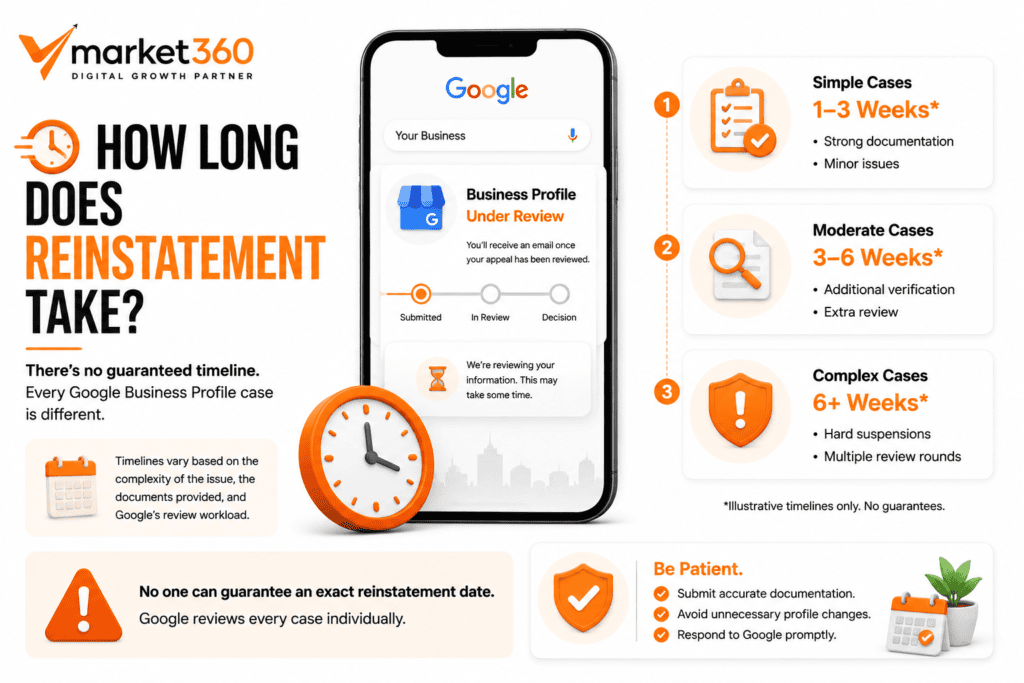
There’s no guaranteed timeline, and any company that promises you an exact number of days is overpromising. Simple, clear-cut cases with strong documentation sometimes resolve in a couple of weeks. More complex cases, especially hard suspensions or situations requiring back-and-forth communication with Google’s review team, can take considerably longer, sometimes stretching into a couple of months if there are multiple rounds of review.
A few factors affect how long your specific case takes: how clear-cut the violation was, how strong and relevant your submitted documentation is, whether your industry requires additional verification (certain categories like legal, medical, and financial services often face more scrutiny), and how quickly you respond if Google requests more information.
It’s also worth setting realistic expectations with your team or anyone relying on that Google Maps visibility. Losing local search traffic for even a few weeks can feel urgent, and it is, but rushing the appeal process with incomplete information almost always backfires and extends the timeline further.
How to Prevent Future Suspensions
Once you’re reinstated, protecting your listing going forward matters just as much as the recovery itself. Follow Google’s guidelines closely rather than relying on outdated advice or assumptions about what’s allowed. Keep your business information accurate and consistent across your website, your Google profile, and any other directories you’re listed in. Make changes to your profile carefully and infrequently rather than constantly tweaking details. Focus on earning genuine customer reviews rather than any shortcut that promises fast results. Avoid keyword stuffing anywhere on your profile, especially in your business name. Maintain consistent NAP information (name, address, phone number) everywhere your business appears online. Keep your business documents current in case you’re ever asked to verify your listing again.
When to Get Professional Help
Some situations call for outside help rather than continuing to handle it alone. If your appeal has already been rejected once, professional guidance can help identify what went wrong before you try again. If you genuinely don’t know what caused the suspension, an experienced set of eyes can often spot the issue faster than trial and error. If your profile has been suspended multiple times, there’s likely a recurring root cause that needs a more thorough fix. And if your business depends heavily on Google Maps for new customers, every day without your listing is a day of lost revenue, which makes getting it right the first time worth the investment.
Why Choose VMarket360 for Google Business Profile Reinstatement?

As a GBP reinstatement service, we’ve worked through Google Business Profile suspensions for businesses across the USA, UK, and Canada, including local businesses right here in Arlington and across Dallas-Fort Worth. Our approach starts with a thorough audit of your profile and account history to identify the actual cause, not just a guess. We help you gather and organize the right documentation before submitting anything, since a rushed or incomplete appeal often costs more time than it saves. Communication stays transparent throughout, so you know exactly where things stand rather than waiting in the dark. Everything we do stays within Google’s guidelines, since shortcuts here tend to create bigger problems later. And once your profile is back online, we help with Google Business Profile optimization so you’re in a stronger position than before the suspension happened.
If you want the full picture of what our reinstatement process looks like, including real client results, our Google Business Profile Reinstatement services page covers that in detail.
Get Your Google Business Profile Back Online
Every day your profile stays suspended is a day local customers are finding your competitors instead of you. VMarket360 is based in Arlington, TX, and helps businesses across Dallas-Fort Worth and beyond recover suspended listings the right way.
Frequently Asked Questions
Common causes include business name guideline violations, address inconsistencies, virtual office addresses, duplicate listings, keyword stuffing, or suspicious account activity. Google rarely gives a specific reason, so identifying the cause often takes some investigation.
In most cases, yes. Once you identify the likely cause, correct it, and submit a well-documented reinstatement request, many suspensions are successfully resolved.
There’s no fixed timeline. Simple cases can resolve in a couple of weeks, while more complex situations can take longer, especially if Google requests additional information or documentation.
Reviews are typically preserved during a suspension, even though they’re not visible while the profile is suspended. Once reinstated, your existing reviews generally reappear.
This is strongly discouraged. Creating a duplicate listing instead of resolving the original suspension usually leads to complications with both profiles and can make the situation harder to fix.
Typically business registration or formation documents, a recent utility bill showing your business address, photos of your storefront or signage, and any relevant industry licenses.
Yes, if the same issues recur or new guideline violations occur. This is why proper ongoing management matters just as much as the initial recovery.
Not always, but it’s worth considering if your appeal has already been rejected, you’re unsure what caused the suspension, your profile has been suspended more than once, or your business depends heavily on Google Maps for new customers.

VMarket360 is based in Arlington, TX, and helps businesses across Dallas-Fort Worth and beyond recover suspended listings the right way. We also provide local SEO services, full SEO services, and digital marketing support to help you grow once you’re back online. Contact us for a free, honest assessment of your situation.